About
"Telemetry for dummies"is a telemetry and analytics plugin for Unreal Engine 5, built in C++ with a team of six for a Sweden-based studio. My focus was the in-engine heatmap system, from the underlying C++ subsystems to the editor tool designers actually use.
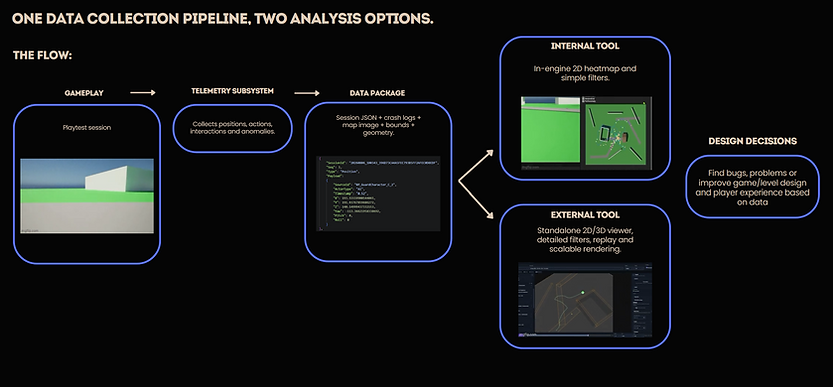
The idea is simple: playtesters generate raw movement and action data, and that data is useless if nobody can read it fast. Logs are exported and read by both an internal and external visualization tool, the heatmap system reads session files straight off disk and renders them directly inside the Unreal editor, filterable by event type, action, and actor, with no hardcoded lists to maintain.
HEATMAP GENERATION
For continuous movement data, the system builds a density grid from raw position samples, interpolating between points so fast-moving paths don't leave gaps, applies a Gaussian blur, then maps the result through a five-stop color gradient into a texture at runtime. Discrete events skip the grid entirely and get drawn as colored dots at their exact location.
-
Density grid built per refresh from filtered telemetry, with configurable cell size and blur sigma
-
Path interpolation between position samples to avoid gaps at high movement speed
-
Five-stop color gradient with alpha scaled to density
-
Deterministic per-event-type dot coloring via string hashing, so the same action renders the same color every time

DATA-DRIVEN FILTERING
Instead of manually maintaining a list of every action or actor type the game can produce, a discovery subsystem scans the loaded telemetry and builds the filter UI from whatever's actually in the data. A new event type shows up, a checkbox appears for it, no engine-side changes required.
-
Filter checkboxes generated at runtime from distinct event types, action ids, and actor types
-
Multi-select combination logic, combine any map filter with any actor type
-
Zero code changes needed when gameplay adds a new trackable action

EDITOR TOOLING
The whole system is exposed through a custom Editor Utility Widget, no separate application, no exporting files. Open the tool inside the editor, tick the filters, hit refresh.
-
Custom Editor Utility Widget with live filter checkboxes and refresh-on-demand
-
Layered overlay rendering, so multiple filtered heatmaps can stack on the same map image
-
Built against a top-down map capture + world-bounds export for accurate position mapping